
Eight words open one Drawer
Each Drawer has eight recovery words. Milkglass shows them once. They open that Drawer when the pattern is forgotten.
By Paul Bădărău, maker of Milkglass.
I make Milkglass. This page describes the current iPhone and iPad app.
What you are given
The screen is titled Recovery words. The line under it says: These 8 words open this Drawer when the pattern is forgotten. Write them down and keep them somewhere safe. Milkglass shows them only now. The words are numbered. You can select them. Copy puts them on the pasteboard of this device for two minutes, then the copy expires.
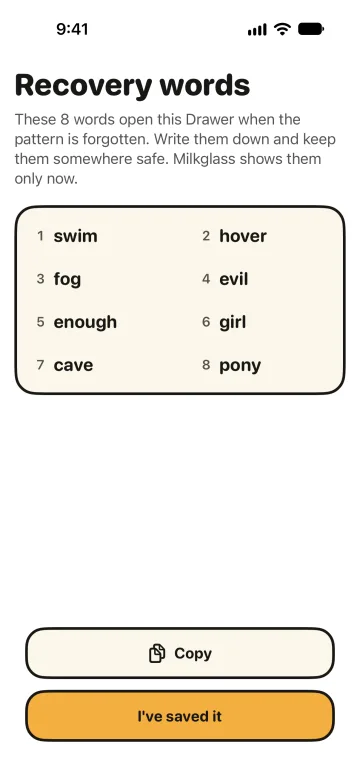
The eight words come from the English word list published with BIP-39. That list has 2,048 words. Milkglass uses the list as a way to write down 11 random bytes. The result is not a BIP-39 mnemonic: there is no checksum word, and the words are not a Bitcoin recovery phrase. You cannot type a sentence of your own.
Shown once, then replaced if you do not confirm
I've saved it asks again. The title is Milkglass will not show these words again. The message is Without the pattern and the recovery words, nobody can open this Drawer. Milkglass cannot open it either. Confirm with I've saved it, or go back with Show the words.
Leave before that confirmation and the next open shows a new set. The first set, or the last set you confirmed, still opens the Drawer until you confirm a replacement. A set shown later and never confirmed stops working when a newer set is shown. Settings can also replace a confirmed set: the confirmed words keep working until you confirm their replacement.
How the words open the Drawer
The words encode those 11 random bytes. Milkglass runs the same kind of slow step it uses for a pattern: PBKDF2 with HMAC-SHA256, 600,000 rounds. That step uses a fixed salt, and it does not use the Device secret that stays on one iPhone. That is why the words can open the Drawer on an iPhone that has never held it, once a finished iCloud backup is there to restore.
The words unwrap the same Drawer key the pattern unwraps. They are not a second copy of the files. How the files are encrypted is the page for that key.
Typing them
On the pattern screen, Use recovery words opens the field. Milkglass accepts the system keyboard and refuses a keyboard from another app. The field has no autocorrection. Enter the eight words, then draw a new pattern. Milkglass shows new recovery words. Save those before you go on.
If both the pattern and the words are gone, Milkglass cannot open the Drawer. There is no account that can reset it. Support says the same thing, and asks you not to send the words in an email.
When this helps
- I forgot my pattern is the short path: eight words, a new pattern, then new words to save.
- Before you sell an iPhone when the decision is what still opens the Drawer after the phone leaves.
- iCloud backup when the words are how a new iPhone gets in, and the backup is what it restores.
- The pattern when you still have it and want the other way in.
References
Checked 10 November 2026.
- BIP-39. Milkglass uses the English word list only. The eight words are not a BIP-39 mnemonic.
- NIST SP 800-132. The slow step applied to the 11 bytes. December 2010.
- Milkglass support: I forgot my pattern. The steps in the app, and the limit when both secrets are gone.
More Milkglass features
Each pattern opens its own Drawer
Milkglass opens to a 3×3 pattern. Each pattern opens one Drawer, with no list and no count. An unknown pattern says no Drawer uses it.
Read the featureAn encrypted backup in your iCloud
Milkglass keeps an encrypted backup in your iCloud. One iPhone or iPad writes it. Restore asks before that device takes over.
Read the featureHow a Drawer is encrypted
Each Drawer has its own random key. The pattern selects the Drawer and is not the file key. Files use AES-GCM. The catalog uses SQLCipher.
Read the feature
Requires iOS 26.1 or iPadOS 26.1.