
An encrypted backup in your iCloud
Each Drawer can keep an encrypted backup in your iCloud. Backup is on when you make the Drawer. One iPhone or iPad writes that backup.
By Paul Bădărău, maker of Milkglass.
I make Milkglass. This page describes the current iPhone and iPad app. On an iPad the same screens say iPad.
The backup is ciphertext you already sealed
Milkglass encrypts a Drawer on the iPhone before anything goes to iCloud. The upload is that sealed backup, in your iCloud, for the Apple Account signed in on this device. Milkglass has no server that receives the pattern or the files. Apple operates iCloud. A person who can use that Apple Account can see that a backup is there and how large it is.
This is the Drawer's own backup. It is not iCloud Photos, and it does not keep two devices editing one Drawer. This version of Milkglass is the iPhone and iPad app. There is no Mac app in this version. Change the Drawer on the device that holds it.
Apple's iCloud encryption page describes how Apple encrypts iCloud data. Milkglass does not rely on that page to describe its records: the app seals them first. The page is useful for what an Apple Account can reach in iCloud.
An item counts as backed up after a check
An item counts as backed up only after the backup holds the same size and the same SHA-256 hash. Until that check passes, the item is still only on this iPhone. Settings, inside the open Drawer, shows the state under iCloud backup: Waiting to back up., Backing up with a count, or Backed up.
One device writes
Restore on another device makes that device the writer. Before it starts, Milkglass asks Restore this Drawer here? The next line is This iPhone will back it up from now on. The buttons are Restore and Not now. If some items had not finished backing up, the screen says how many do not come across.
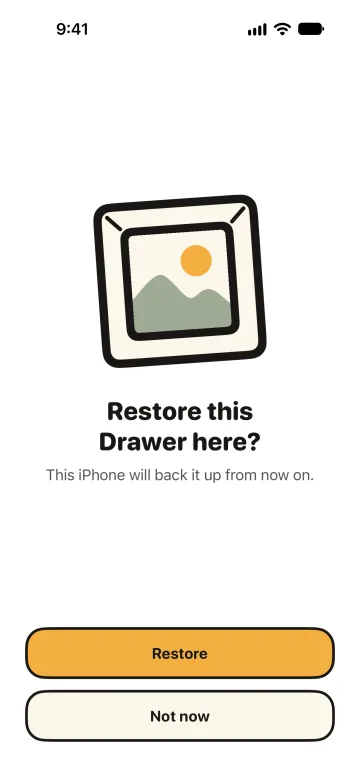
The earlier device keeps its local Drawer and can still open it. It stops writing the backup and says This Drawer now backs up from another iPhone. Back up from this iPhone again asks before that device becomes the writer once more. The backup then holds the version on that device, and the other device stops backing it up.
During a restore the Drawer takes no other changes. If some content never arrives, Milkglass names the gap and offers End the restore. That confirmation says how many items leave this iPhone because their content is not in the backup, and how many stay. Nothing ends the restore by itself.
On a new iPhone, sign in to the same Apple Account and draw the pattern. When the secret that travels with the Apple Account has arrived, that pattern opens the backup. When it has not, Use recovery words is the way in. Support walks through the same path. The recovery words do not depend on the Device secret that stays on the old iPhone.
A pause names the cause
The backup can pause. The line in Settings starts with Paused: and then one of these: iCloud is full, this iPhone is not signed in to iCloud, no connection, this iPhone is full, or iCloud gave an answer that Milkglass cannot use. Your items stay on this iPhone. Milkglass sends no notification about the pause. Open the Drawer to read the line.
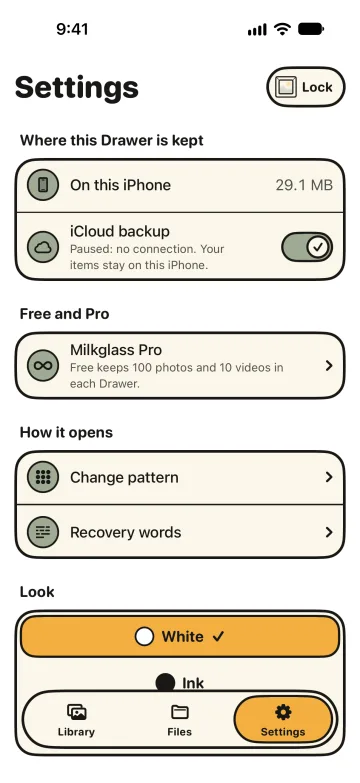
You can turn backup off. The question is Turn off iCloud backup? New items then stay only on this iPhone. You can keep the backup that is already in iCloud, or delete it. A deleted backup cannot restore this Drawer on a new iPhone.
The iPhone's own backup is a different copy
Apple describes iCloud Backup as a copy of what is not already synced, and names iCloud Photos as sync across devices. A Milkglass backup is neither of those. The Drawer stored on this iPhone is also marked so the iPhone's device backup leaves it out. Finder backup or iCloud Backup of the phone is not how you move a Drawer. The restorable copy is the Drawer's own iCloud backup, after the items you care about have finished. Apple documents the flag the app sets: isExcludedFromBackup.
When this helps
- After importing photos when the question is the Photos copy and iCloud Photos, which this backup does not replace.
- Before you sell an iPhone when you need the Drawer on a phone you still have, and a finished backup before the old phone goes.
- A shared Apple Account when someone else can see the account's iCloud, including that this backup exists.
- How the Drawer is encrypted for what "sealed before upload" refers to.
References
Checked 10 November 2026.
- Apple Platform Security: iCloud encryption. How Apple encrypts iCloud. Milkglass seals its records before upload.
- Apple: What does iCloud back up? iCloud Backup copies what is not already synced. iCloud Photos is named there as sync.
- Apple Developer: isExcludedFromBackup. The flag that keeps the on-device Drawer out of the device backup.
- Apple: how iCloud Photos handles deleted photos. A different copy from this Drawer's backup. The import guide uses the same page.
- Milkglass support: a new iPhone. The restore question, recovery words, and items that had not finished backing up.
More Milkglass features
Eight words open one Drawer
Each Drawer has eight recovery words from the BIP-39 English list. Milkglass shows them once. They open that Drawer when the pattern is forgotten.
Read the featureHow a Drawer is encrypted
Each Drawer has its own random key. The pattern selects the Drawer and is not the file key. Files use AES-GCM. The catalog uses SQLCipher.
Read the featureThe file you hand over is the file Milkglass seals
Milkglass seals the file it receives and does not recompress it. Share writes those bytes back. A camera still is the exception.
Read the feature
Requires iOS 26.1 or iPadOS 26.1.