
Each pattern opens its own Drawer
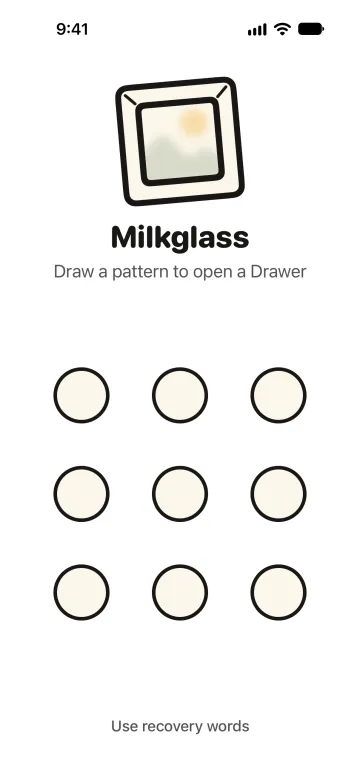
Milkglass opens to nine dots. A pattern of at least four dots opens one Drawer. A different pattern opens a different Drawer. The screen shows no names, no list, and no count.
By Paul Bădărău, maker of Milkglass.
I make Milkglass. This page describes the current iPhone and iPad app. It is not a ranking of other apps.
The first screen is the grid
The grid is 3 by 3. A pattern connects at least 4 dots and does not reuse a dot. If the stroke is shorter, the screen says Connect at least 4 dots. Under the grid, Use recovery words is the other way in. The eight recovery words belong to one Drawer.
You can make as many Drawers as you want. The Free limits count photos and videos inside the Drawer you have open. Reaching a limit can show the Pro offer. The number of Drawers does not. See the Free limits and reference prices.
An unknown pattern says so
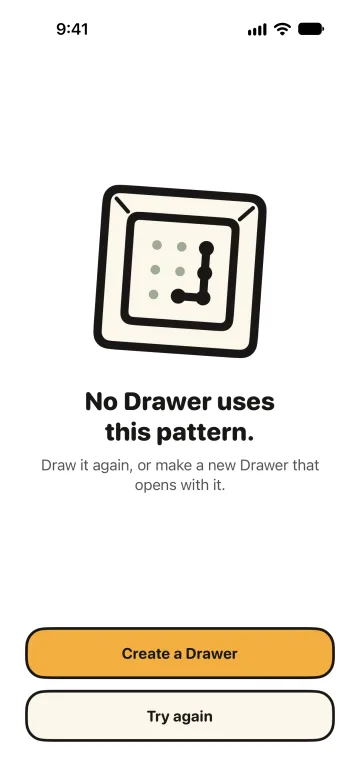
A pattern that opens nothing shows No Drawer uses this pattern. The next line says Draw it again, or make a new Drawer that opens with it. The buttons are Create a Drawer and Try again. That screen looks the same whether the iPhone holds no Drawer or several. Create asks you to draw the pattern again, then shows the recovery words.
For example, one pattern can hold scans of a lease, and another can hold everyday photos. Those are two Drawers. Making the second one does not list the first, and it does not delete it.
There is no pattern that erases the other Drawers. A second pattern only opens its own Drawer.
Several wrong tries add a wait
After several patterns that open nothing, Milkglass waits before the next try. The wait grows, up to one hour. It continues after you leave the app and after you restart the iPhone. Changing Date & Time does not shorten it. Opening a Drawer does not clear the count. Making a Drawer and changing a pattern count too.
The wait applies on this iPhone. How the files are encrypted is a separate question from how long the app makes you wait.
What stays visible
Milkglass is an app on the Home Screen. Device storage and other system records can show that it holds data, and how much. A person with your unlocked iPhone and its passcode can try patterns. A missing list does not remove the app icon or the storage size.
The same grid is on iPad. The wording says iPad where this page says iPhone, for example On this iPad.
When this helps
- The Hidden album keeps selected photos in Photos, behind the phone's own authentication, in one collection.
- Locking the Photos app asks for Face ID, Touch ID, or the passcode before Photos opens. It does not make a second collection with its own pattern.
- Choosing a private photo app is the longer checklist: access, encryption, copies left in Photos, backup, and recovery.
- Milkglass and Vaultaire if you are comparing two pattern apps and want the dated differences.
References
Checked 10 November 2026.
- Apple's Hidden album guide. One locked collection inside Photos, using device authentication.
- Apple's instructions to lock or hide an app. A lock on Photos is not a separate Drawer.
- How a Milkglass Drawer is encrypted. The pattern selects the Drawer. The file key is separate.
More Milkglass features
How a Drawer is encrypted
Each Drawer has its own random key. The pattern selects the Drawer and is not the file key. Files use AES-GCM. The catalog uses SQLCipher.
Read the featureEight words open one Drawer
Each Drawer has eight recovery words from the BIP-39 English list. Milkglass shows them once. They open that Drawer when the pattern is forgotten.
Read the featureWhat a screenshot of Milkglass shows
Milkglass keeps the pattern, recovery words, and an open Drawer out of screenshots when the secure layer is present, and covers the screen while it is recorded or mirrored.
Read the feature
Requires iOS 26.1 or iPadOS 26.1.