
Library, Files, and folders
Photos and videos go to Library. Other files go to Files, where you can make folders. Deleted items stay in Recently Deleted for 30 days.
By Paul Bădărău, maker of Milkglass.
I make Milkglass. This page describes the current iPhone and iPad app.
Two places in one Drawer
An open Drawer has Library and Files. A photo or a video, from the camera or from import, goes to Library. A document or any other file goes to Files. New Folder is on the Files tab. Folders can hold files and other folders. Photos stay in Library. They do not move into a folder.
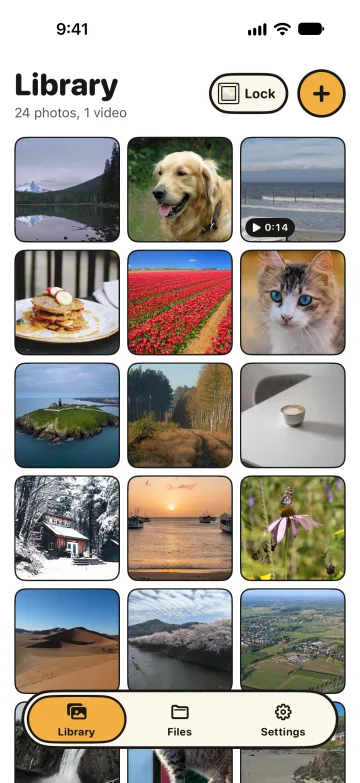
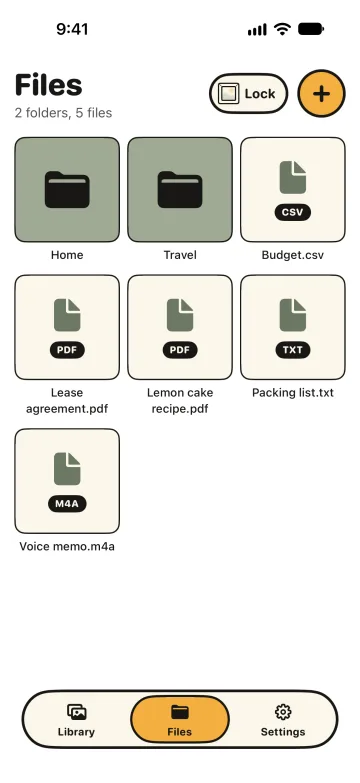
Open a photo, a video, audio, a PDF, or a text file to preview it. Other known types open in Quick Look when the system can show them. A text file larger than 500,000 bytes shows its first part. Original files explains what import seals and what Share writes. The camera is one way a photo or video arrives.
Rename, move, share, and delete
You can rename an item. You can move a file or a folder. Share is for a photo, a video, or a file, and it makes a readable copy for the system share sheet. Milkglass removes that copy when the sheet ends, unless a preview is still showing it. A folder has no Share action. Delete asks first. A folder asks Delete this folder and everything in it? The message says the item stays in Recently Deleted for 30 days.
Empty this Drawer is in Settings. Draw the pattern to confirm. It removes every photo, video, and file from this iPhone, including Recently Deleted. The Drawer and its pattern remain. Deleting the iCloud backup is a separate action. iCloud backup has the switch for that backup.
Recently Deleted still counts
Settings lists Recently Deleted. Items stay there for 30 days. Tap one to restore it or delete it now. For the Free limits, a photo or video in Recently Deleted still counts until it is gone. The count is 100 photos and 10 videos in each Drawer. Files have no count like that. The count lives inside the open Drawer, so the Pro offer does not reveal how many other Drawers exist.
Reaching the limit stops adding a new photo or video from Photos, from Files, or from Take Photo or Video. A capture taken at the limit is not saved to Photos and is not kept. You can still open the Drawer and use Share. Reference prices, and what Pro changes, are on the product page. One purchase covers iPhone and iPad.
When this helps
- How to keep files private on iPhone when the item is a document and a folder move is not the decision you need.
- The Hidden album when the photo should stay in Photos, in one locked collection.
- Original files when the question is whether Milkglass recompresses the file it receives.
- The camera when you want the photo taken into Library without a save to Photos.
References
Checked 10 November 2026.
- Milkglass reference prices and Free limits. 100 photos and 10 videos on Free, inside each Drawer. The App Store shows the price for your storefront.
- The file Milkglass seals. Import, Share, and the camera exception.
- Keep files private on iPhone. The task guide for documents, next to this description of Files.
More Milkglass features
The file you hand over is the file Milkglass seals
Milkglass seals the file it receives and does not recompress it. Share writes those bytes back. A camera still is the exception.
Read the featureA camera that stays in the Drawer
The Milkglass camera saves a photo or video into the open Drawer. A still is a new JPEG. The capture is not written to Photos.
Read the featureAn encrypted backup in your iCloud
Milkglass keeps an encrypted backup in your iCloud. One iPhone or iPad writes it. Restore asks before that device takes over.
Read the feature
Requires iOS 26.1 or iPadOS 26.1.