
A camera that stays in the Drawer
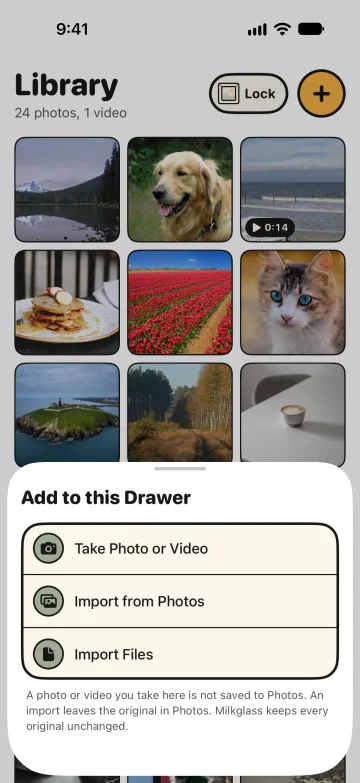
Take Photo or Video saves into the open Drawer. Milkglass does not write that capture to Photos.
By Paul Bădărău, maker of Milkglass.
I make Milkglass. This page describes the current iPhone and iPad app.
Where the capture goes
In an open Drawer, Add to this Drawer includes Take Photo or Video. The system camera opens for a still or a movie. Milkglass then seals the file into this Drawer. The app does not call the photo library to save it. The footnote on the add sheet says A photo or video you take here is not saved to Photos.
The Camera app is a different path. Apple's current guide says Live Photos are saved in your photo library, and the Shared Photo Library guide says Camera saves to your personal library by default. A capture you take inside Milkglass is not that Camera-app save.
A still is a new JPEG
A still is re-encoded as a JPEG at quality 0.95 and named Photo plus the time, with a .jpg ending. That file is new. It is not the sensor's original, and it is not the file the Camera app would have written. Quality 0.95 is the setting in this app. It is not a claim about a particular camera mode.
The iPhone asks the first time. The reason it shows is Milkglass uses the camera when you take a photo or video for a Drawer. A video also asks for the microphone: Milkglass uses the microphone when you record a video for a Drawer.
Video is the movie file the camera returns
A video is copied from the movie file the system camera returns. The picker asks for high quality. That request is not a promise of ProRes, of 4K, or of a particular frame size. The phone and the camera mode decide the file. Milkglass copies the file it is given and seals it. The name is Video plus the time, and the original filename extension.
If this iPhone has no camera, the row says The camera is not available on this iPhone. and cannot be chosen. Import from Photos and Import Files stay available. What those imports do with the file they receive is on Original files.
When this helps
- The Hidden album when the photo should stay in Photos, behind the phone's own authentication, instead of being taken inside a Drawer.
- Remove location from a photo when you already have a file and want to check or remove location data before you send it. A Milkglass camera still is a new JPEG. This page does not claim that JPEG has no location.
- Original files for the import path, which does not recompress the file it receives. The camera still is the exception.
- Library and Files for where the new photo or video lands.
References
Checked 10 November 2026.
- UIImagePickerController. The system camera Milkglass presents for a still or a movie.
- Apple: Take Live Photos. Live Photos from Camera are saved in the photo library. Checked as the current unversioned guide.
- Apple: add content to a Shared Photo Library. Camera saves to the personal library by default.
More Milkglass features
The file you hand over is the file Milkglass seals
Milkglass seals the file it receives and does not recompress it. Share writes those bytes back. A camera still is the exception.
Read the featureLibrary, Files, and folders
An open Drawer has a Library for photos and videos and Files for everything else, including folders. Deleted items stay for 30 days.
Read the feature
Requires iOS 26.1 or iPadOS 26.1.